
Medication Log (Medicine)
Add marks ◯,
☓ or △ on the name of medicine.
By doing so, you can see at one view if you did take yourmedication or not.
You can also take a note (memo) missed dose or something that you are worried about and save it as a journal.**User Guide**
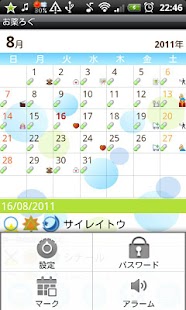
Initial Screen is the calendar.
1.
Setting: You can customize the calendar.2.
Mark: You can add marks on the date of the calendar.*You can delete marks by selecting the same mark and then tap twice.
3.
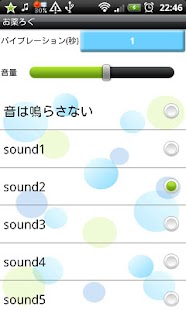
Alarm: Set vibration duration, volume and alarm sound.4.
Password: Set password.
*From the left button*1.
"Today" button: Go back to the today's date.2.
"Left" and "Right" button: Move the date right and left.3.
"Registration" button: Make a list of your medication.
Press "New" then move to the registration screen.4.
"List" button: You can see the list of your medication log.
1.
Press "Registration" button on the calendar screen → Press "New" → Move to the registration screen.2.
Enter the name of the medicine, duration of your medication, when you take it and set the alarm.
→ Press "Save".3.
When you save it, you can confirm that your medicined is added on the list.
1.
After you saved the medication on the registration screen, go back to the calendar.2.
You can confirm the name of the medicine and when you take them on the lower part of the calendar.3.
After you take the medication, tap the name of the medicine.4.
Move to the "Did you take your medication?" screen.5.
Select "morning", "noon" or "night" from the drop-down list and then tap one of the buttons ◯,
☓, and △.
→Press "Save".6.
◯ = you took the medication,
☓ = you forgot to take and △ = you took it late.7.
You can take a note (memo).
Support Android Wear Vibration
About Medication Log (Medicine)
- Package name (App ID)
- info.androidx.medicinecalen
- Available on
- Google Play
- Price
- Free
- Version
- v1.0.28
- Developer
- GalleryApp
Looking for the Medication Log (Medicine) APK?
The safest way to get Medication Log (Medicine) (info.androidx.medicinecalen) on your Android device is to install it directly from Google Play — you'll always get the latest official version, automatic updates, and no risk of modified or infected APK files from third-party sites.
Music Features
Enjoy high-quality music streaming and playback features.
Productivity Tools
Boost your productivity with powerful tools and features.
Smart Home
Control and monitor your home with smart features.
See Medication Log (Medicine) in Action
Frequently Asked Questions
Is Medication Log (Medicine) free?
Yes, Medication Log (Medicine) is free to download and install on Android through Google Play.
How do I install Medication Log (Medicine) on Android?
Open Google Play on your Android phone or tablet, search for Medication Log (Medicine) by GalleryApp or tap the Google Play button on this page, then tap Install. The app downloads and installs automatically.
What is info.androidx.medicinecalen?
info.androidx.medicinecalen is the App ID (package name) of Medication Log (Medicine) on Google Play. Every Android app has a unique package name, and it is the safest way to verify you are installing the official app.
Is Medication Log (Medicine) safe to download?
Installing Medication Log (Medicine) from Google Play is the safest option: you get the official version published by GalleryApp, verified by Google Play Protect, with automatic updates. Avoid APK files from unofficial third-party sites.
Get Medication Log (Medicine) Today
Medication Log (Medicine) for Android — free download on Google Play.
Compatible with Android phones and tablets — available on Google Play.
Ask AI about this app
Get instant answers about features, tips and more from popular AI assistants.